使用Cloudflare的Worker来扩展安全规则并自动拉黑IP
Cloudflare免费版套餐安全规则只能设置5条,很多人会感觉不够用。昨天研究Cloudflare自动拉黑IP时发现可以把代码放到Worker上扩展安全规则,并且可以通过Worker调用IP Access Rules来实现IP长期拉黑效果。
前言
此教程可以适用普通域名DNS整个托管到Cloudflare,也适用于CloudFlare SAAS方式cname接入的域名。
Worker的判断规则运行于Cloudflare的WAF安全规则之后,和CDN缓存之前。会接管请求进行判断放行还是拦截。
当请求未命中Worker规则时会直接将请求正常转发,如果命中判断规则会返回403并将IP写入IP Access Rules黑名单。
IP Access Rules不依赖于Worker,后期删除Worker后IP Access Rules黑名单也会继续拦截。
总结就是Worker的判断规则会轻微增加页面请求耗时,所以本文没有使用数据库等方式存储。只使用简单的判断规则。
确认下我们的Cloudflare套餐,免费版有如下限制:
IP Access Rules免费版套餐最多可以拉黑5万条IP。
Worker免费版每天10万次请求,每天UTC0点重置。账号下所有Worker共享10万次。
每天10万次请求适合中小网站使用,如果请求数超过10万次,会自动绕过Worker。不影响网站访问。
操作准备
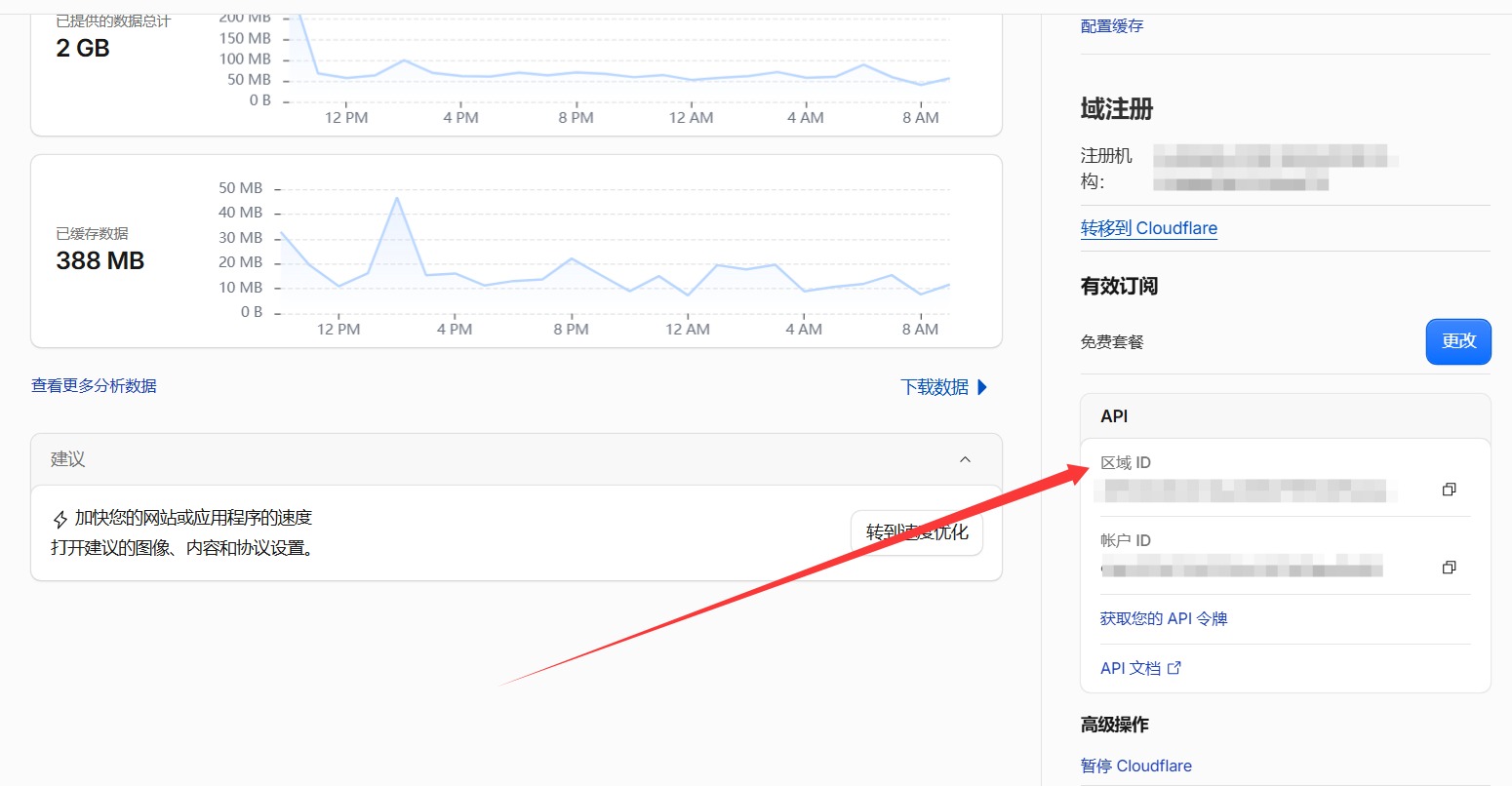
保存区域ID
区域ID在英文页面下叫Zone ID。
打开域名管理首页,页面右下角就可以看到。我们复制保存下来。
创建API令牌
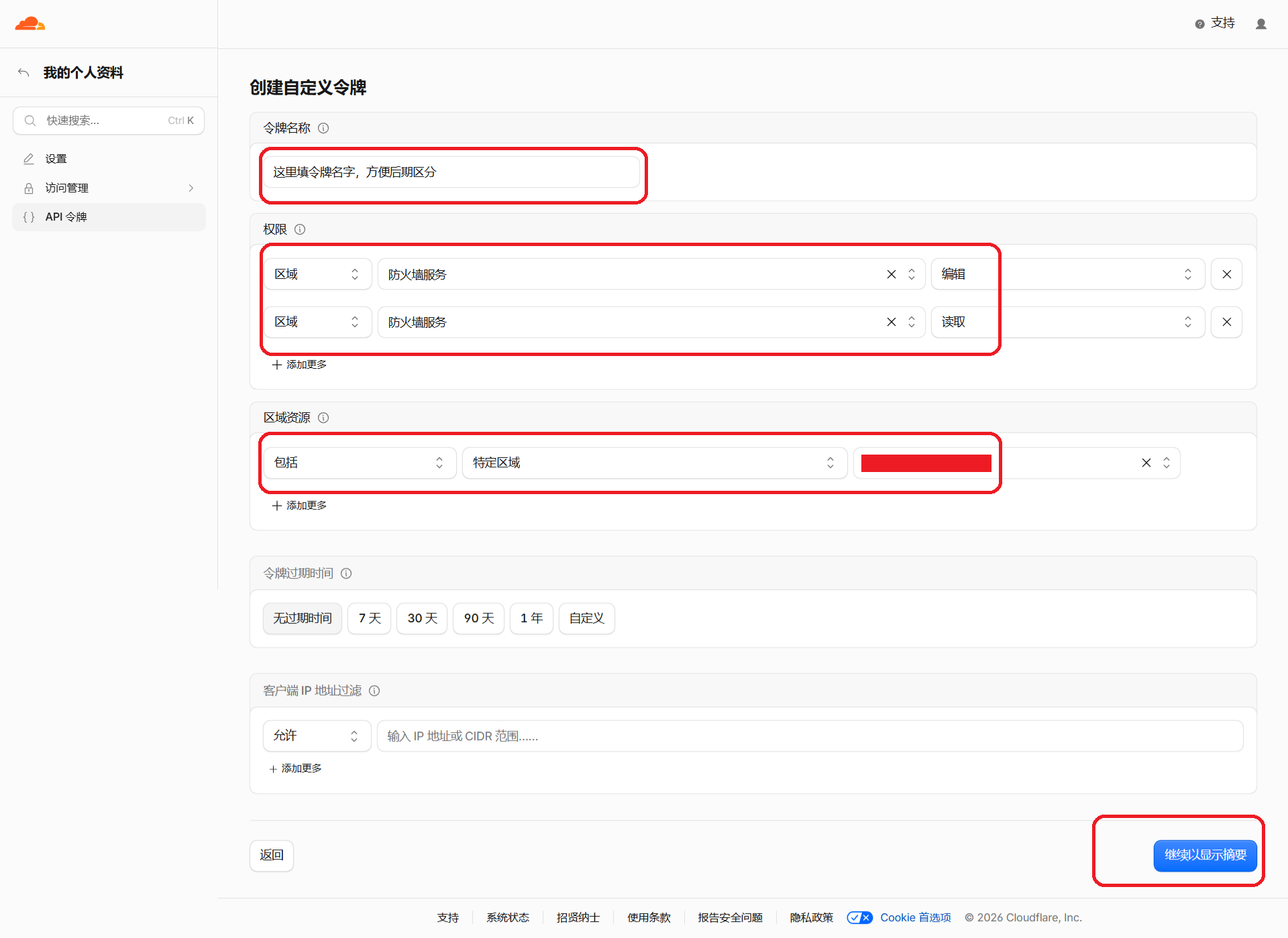
同样在区域ID页面,下面有一个“获取您的 API 令牌”我们点击进去创建一个。
创建时填入:API令牌名字、区域-防火墙服务-编辑和读取权限、区域资源选择你的域名。
注意后面令牌只显示一次,一定复制保存下来。否则就删除再创建一个新的。
教程步骤
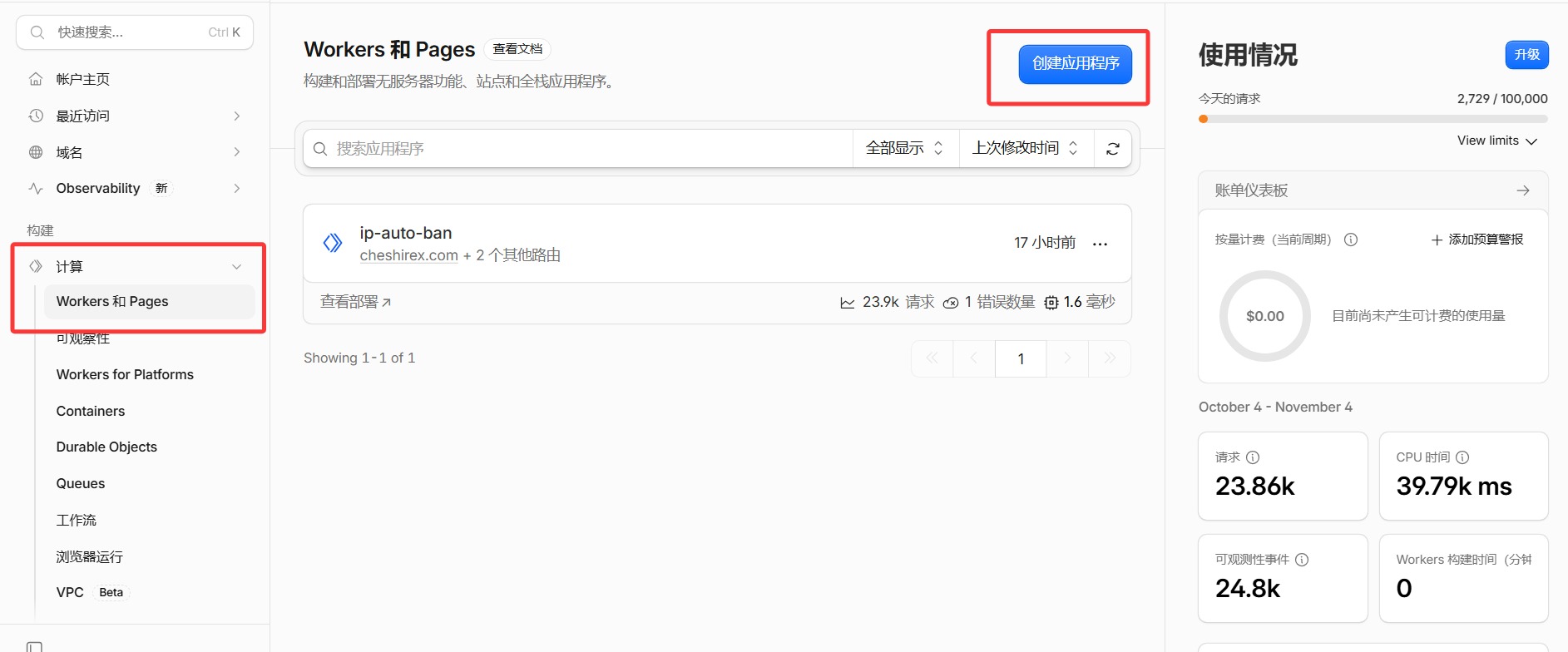
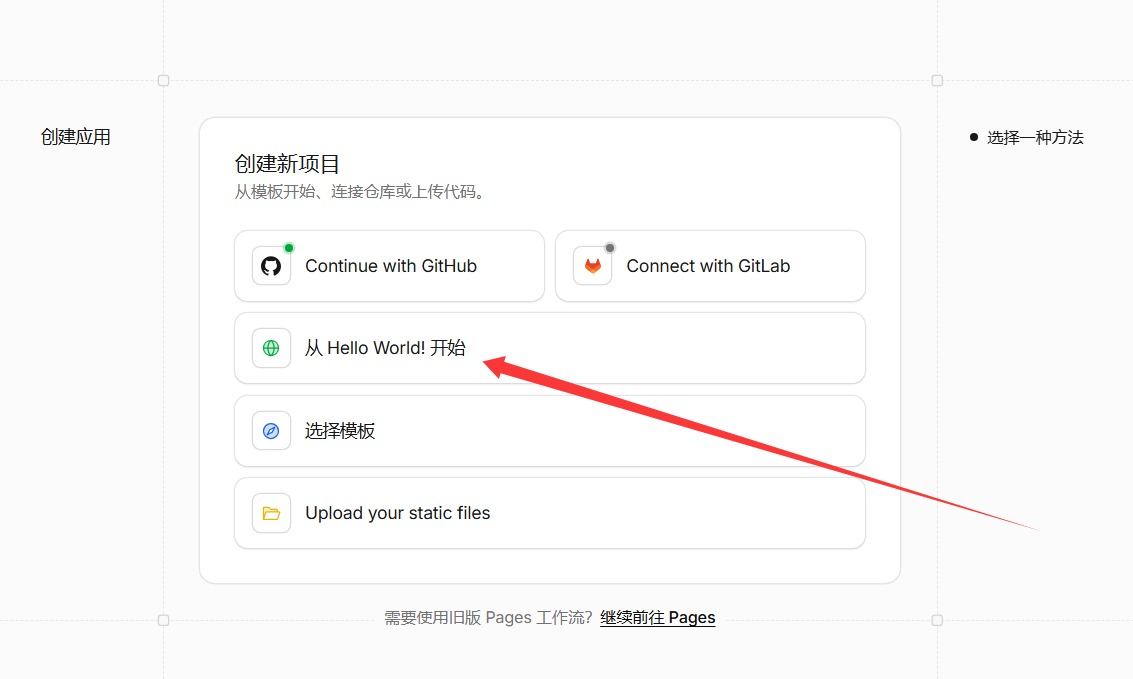
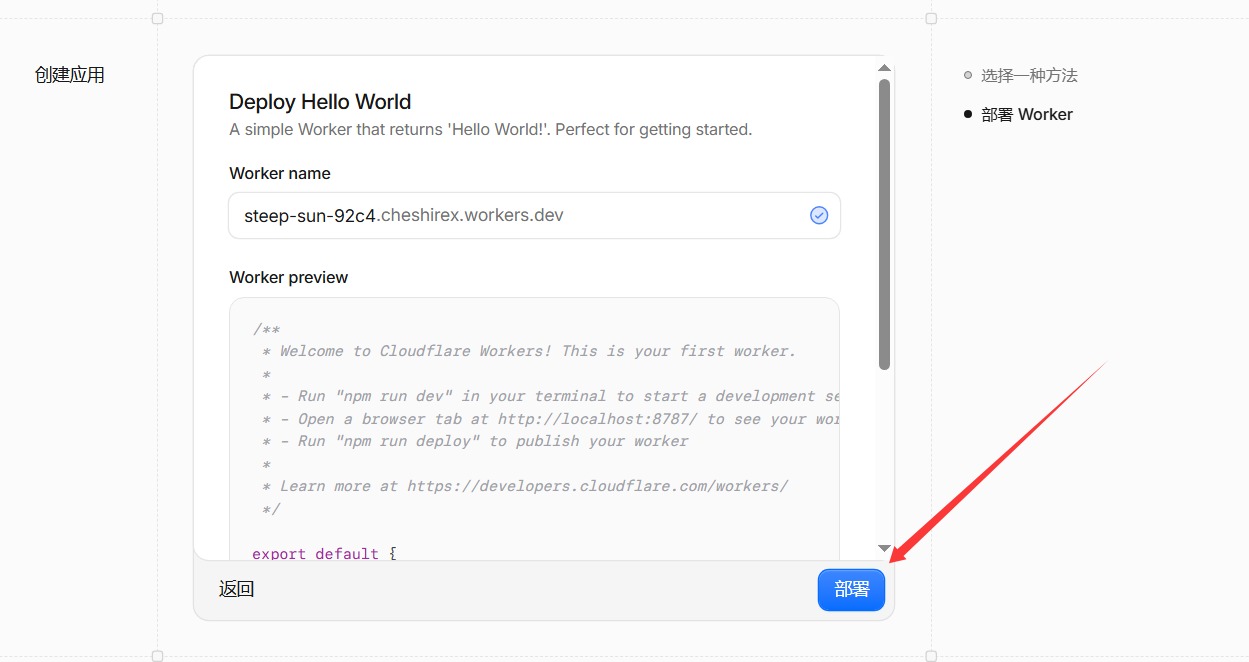
1.部署Worker
部署时选择基础hello world模板创建。
2.写入规则并部署
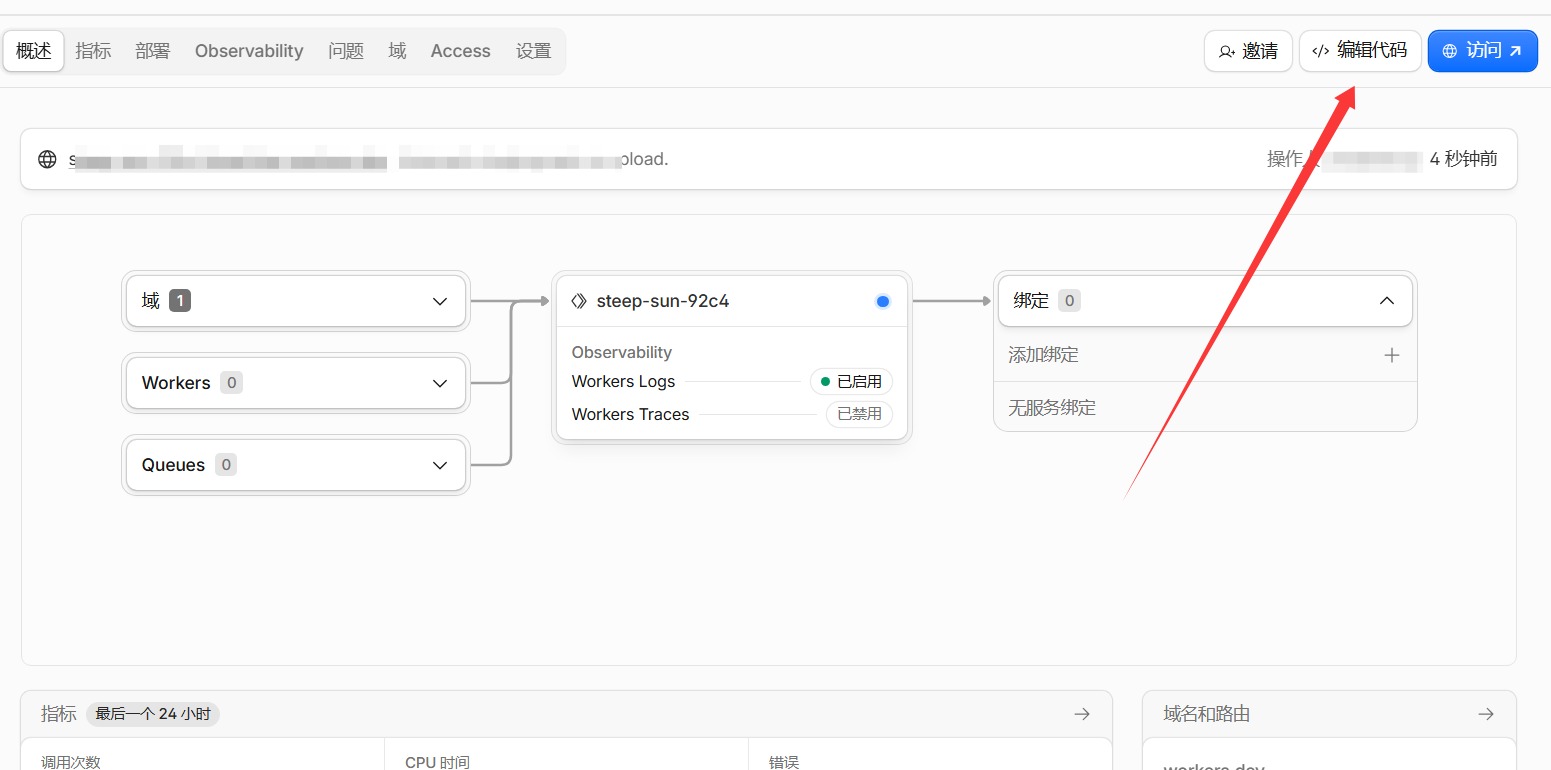
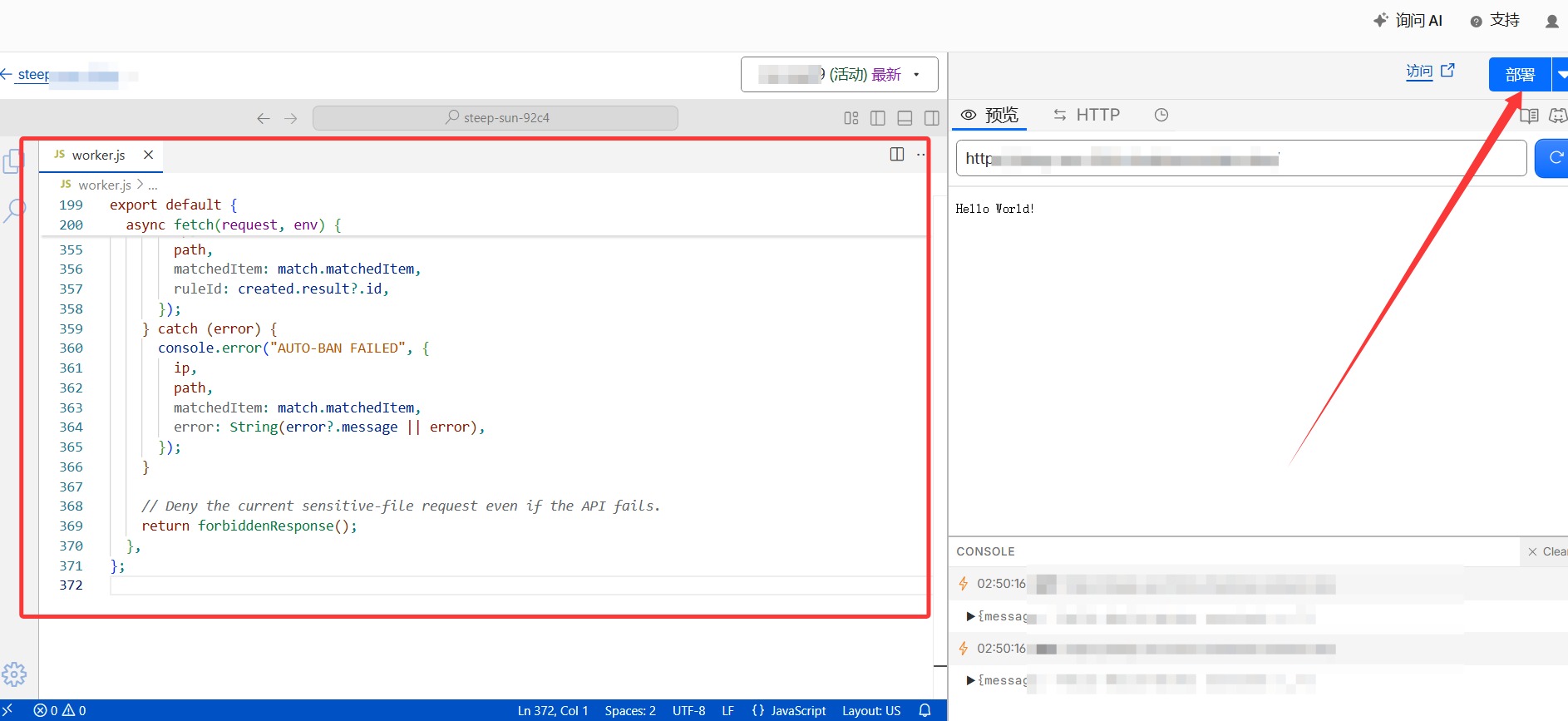
将默认的代码全选删除,替换成我们的代码。
下面代码中的检测项可以自己根据实际需求编辑替换,一行一个。规则如下:
| database.sql | 匹配任意目录下的database.sql |
| /wp-content/.env | 只匹配这个完整路径 |
| *.sql | 匹配任意目录下以.sql结尾的文件名 |
| www\.zip | 自动按www.zip处理 |
| 以#开头的行 | 注释行,不参与检测 |
| 空白行会忽略 |
const CF_API_BASE = "https://api.cloudflare.com/client/v4";

/*
* ==================== CUSTOM DETECTION LIST ====================
* Add one item per line. Blank lines and lines beginning with # are ignored.
*
* Matching rules:
* 1. A filename without / matches that filename in ANY directory.
* Example: database.sql matches /database.sql and /wp-content/uploads/database.sql
* 2. An item containing / is treated as a path and matches that path exactly.
* Example: /wp-content/.env matches only that exact path.
* 3. * is a wildcard (zero or more characters).
* Example: .env* matches .env, .env.local, .env.production, etc.
* 4. Matching is case-insensitive. Items are literal text, not regular expressions.
* 5. `www\\.zip` is also accepted and normalized to `www.zip` for convenience
* when copying paths that have escaped dots in Markdown or logs.
*
* Be cautious with broad entries such as *.zip or *.sql: they may match legitimate
* downloads. Start with specific filenames and paths, then customize as needed.
*/
const SENSITIVE_ITEMS_TEXT = String.raw`
# Environment/configuration files
.env
.env.local
.env.production
.env.development
.env.staging
wp-config.php
wp-config-sample.php
/wp-content/.env
/wp-includes/.env
/wp-content/plugins/.env
/wp-content/themes/.env
/.git/config

# Database files and exports
database.sql
database.sql.gz
database.sqlite
database.sqlite3
database.zip
database-dump.sql
database-backup.zip
db.sql
db.sql.gz
db.zip
db_backup.sql
db_backup.zip
data.db
data.sql
data.sqlite
data.sqlite3
mysql.sql
mysql.sql.gz
mysql.zip
backup.sql
backup.sql.gz
backup.sql.zip
backup.tar.gz
backup.zip
backup.7z
backup.rar
backup.bak
dump.sql
dump.zip
site.sql
site.zip

# Website/source archives from common scanner probes
cheshirex.zip
cheshirex.com.zip
wordpress.zip
wp.zip
www\.zip
wwwroot.zip
webroot.zip
public_html.zip
htdocs.zip
html.zip
source.zip
full.zip
archive.zip
archives.zip

# Add your own entries below, one per line
`;

function normalizePath(rawPath) {
let path = String(rawPath || "/");

// Decode encoded paths (including double-encoded probes) safely, at most twice.
for (let i = 0; i < 2; i++) {
try {
const decoded = decodeURIComponent(path);
if (decoded === path) break;
path = decoded;
} catch {
break;
}
}

// Interpret escaped-dot paths such as /www\\.zip as /www.zip, then canonicalize slashes.
path = path
.replace(/\\\./g, ".")
.replace(/\\/g, "/")
.replace(/\/{2,}/g, "/")
.toLowerCase();

if (path.length > 1) path = path.replace(/\/+$/, "");
return path || "/";
}

function globToRegExp(pattern) {
const escaped = pattern.replace(/[|\\{}()[\]^$+?.]/g, "\\$&");
return new RegExp(`^${escaped.replace(/\*/g, ".*")}$`, "i");
}

function buildDetectionList(text) {
return text
.split(/\r?\n/)
.map((line) => line.trim())
.filter((line) => line && !line.startsWith("#"))
.map((rawItem) => {
// Allow `www\\.zip` from escaped Markdown/log tables to mean `www.zip`.
let item = rawItem.replace(/\\\./g, ".").trim().toLowerCase();
const isPath = item.includes("/");

if (isPath) {
if (!item.startsWith("/")) item = `/${item}`;
item = normalizePath(item);
}

return {
rawItem,
item,
isPath,
matcher: globToRegExp(item),
};
});
}

const SENSITIVE_ITEMS = buildDetectionList(SENSITIVE_ITEMS_TEXT);

function detectSensitivePath(path) {
const segments = path.split("/").filter(Boolean);
const basename = segments.length ? segments[segments.length - 1] : "";

const matched = SENSITIVE_ITEMS.find((entry) => {
return entry.isPath
? entry.matcher.test(path)
: entry.matcher.test(basename);
});

if (!matched) return null;

return {
reason: "configured sensitive item",
matchedItem: matched.rawItem,
};
}

function forbiddenResponse() {
return new Response("Forbidden", {
status: 403,
headers: {
"Content-Type": "text/plain; charset=UTF-8",
"Cache-Control": "no-store",
"X-Content-Type-Options": "nosniff",
},
});
}

function safeJsonStringify(value) {
try {
return JSON.stringify(value);
} catch {
return String(value);
}
}

async function readJson(response) {
try {
return await response.json();
} catch {
return null;
}
}

function apiErrorText(response, payload) {
const errors = Array.isArray(payload?.errors)
? payload.errors
.map((item) => `${item.code ?? "?"}: ${item.message ?? "Unknown API error"}`)
.join("; ")
: "";

return `HTTP ${response.status}; ${errors || safeJsonStringify(payload) || "No JSON response"}`;
}

export default {
async fetch(request, env) {
const url = new URL(request.url);
const path = normalizePath(url.pathname);
const match = detectSensitivePath(path);

if (!match) {
// Avoid a self-fetch loop when someone opens the workers.dev URL directly.
if (url.hostname.endsWith(".workers.dev")) {
return new Response("ip-auto-ban is running; no sensitive item matched.", {
status: 200,
headers: {
"Content-Type": "text/plain; charset=UTF-8",
"Cache-Control": "no-store",
},
});
}
return fetch(request);
}

const ip = (request.headers.get("CF-Connecting-IP") || "").trim();
if (!ip) {
console.error("Sensitive item matched, but CF-Connecting-IP is missing", {
path,
matchedItem: match.matchedItem,
});
return forbiddenResponse();
}

// Fail-safe: persistent blocking only occurs when DRY_RUN is explicitly "false".
const dryRun = String(env.DRY_RUN ?? "true").trim().toLowerCase() !== "false";
const zoneId = String(env.CF_ZONE_ID ?? "").trim();
const apiToken = String(env.CF_API_TOKEN ?? "").trim();
const allowlist = String(env.ALLOWLIST_IPS ?? "")
.split(/[\s,;]+/)
.map((item) => item.trim().toLowerCase())
.filter(Boolean);
const isAllowlisted = allowlist.includes(ip.toLowerCase());

console.log("SENSITIVE PATH MATCH", {
ip,
path,
matchedItem: match.matchedItem,
dryRun,
isAllowlisted,
});

if (!zoneId || !apiToken) {
console.error("Auto-ban is not configured: missing CF_ZONE_ID or CF_API_TOKEN", {
ip,
path,
dryRun,
hasZoneId: Boolean(zoneId),
hasApiToken: Boolean(apiToken),
});
return forbiddenResponse();
}

const apiUrl = new URL(
`${CF_API_BASE}/zones/${encodeURIComponent(zoneId)}/firewall/access_rules/rules`
);
const lookupUrl = new URL(apiUrl.toString());

// Use the IPv4 target filter for IPv4. For IPv6, query by exact configuration value.
if (!ip.includes(":")) {
lookupUrl.searchParams.set("configuration.target", "ip");
}
lookupUrl.searchParams.set("configuration.value", ip);
lookupUrl.searchParams.set("per_page", "100");
lookupUrl.searchParams.set("page", "1");

const headers = {
Authorization: `Bearer ${apiToken}`,
"Content-Type": "application/json",
};

try {
// Query first even in DRY_RUN to verify read access and Zone ID.
const lookupResponse = await fetch(lookupUrl.toString(), {
method: "GET",
headers,
});
const lookup = await readJson(lookupResponse);

if (!lookupResponse.ok || !lookup?.success) {
throw new Error(
`Query IP Access Rules failed: ${apiErrorText(lookupResponse, lookup)}`
);
}

const matches = (Array.isArray(lookup.result) ? lookup.result : []).filter(
(rule) =>
String(rule.configuration?.value ?? "").toLowerCase() === ip.toLowerCase()
);

// Never override an existing manual whitelist.
const whitelistRules = matches.filter((rule) => rule.mode === "whitelist");
if (whitelistRules.length) {
console.warn("MANUAL WHITELIST FOUND; persistent auto-ban skipped", {
ip,
path,
ruleIds: whitelistRules.map((rule) => rule.id),
});
return forbiddenResponse();
}

if (isAllowlisted) {
console.warn("ALLOWLISTED IP; persistent auto-ban skipped", {
ip,
path,
matchedItem: match.matchedItem,
});
return forbiddenResponse();
}

const alreadyBlocked = matches.some((rule) => rule.mode === "block");

if (dryRun) {
console.log("DRY RUN API CHECK OK", {
ip,
path,
matchedItem: match.matchedItem,
existingRules: matches.map((rule) => ({ id: rule.id, mode: rule.mode })),
alreadyBlocked,
createRequestSkipped: true,
});
return forbiddenResponse();
}

if (alreadyBlocked) {
console.log("IP ALREADY BLOCKED; no duplicate rule created", { ip, path });
return forbiddenResponse();
}

const createResponse = await fetch(apiUrl.toString(), {
method: "POST",
headers,
body: JSON.stringify({
configuration: {
target: ip.includes(":") ? "ip6" : "ip",
value: ip,
},
mode: "block",
notes: `Auto-ban: ${match.reason}; item=${match.matchedItem}; path=${path.slice(0, 120)}`,
}),
});
const created = await readJson(createResponse);

if (!createResponse.ok || !created?.success) {
throw new Error(
`Create IP Access Rule failed: ${apiErrorText(createResponse, created)}`
);
}

console.warn("IP ACCESS RULE CREATED", {
ip,
path,
matchedItem: match.matchedItem,
ruleId: created.result?.id,
});
} catch (error) {
console.error("AUTO-BAN FAILED", {
ip,
path,
matchedItem: match.matchedItem,
error: String(error?.message || error),
});
}

// Deny the current sensitive-file request even if the API fails.
return forbiddenResponse();
},
};
3.添加变量和密钥
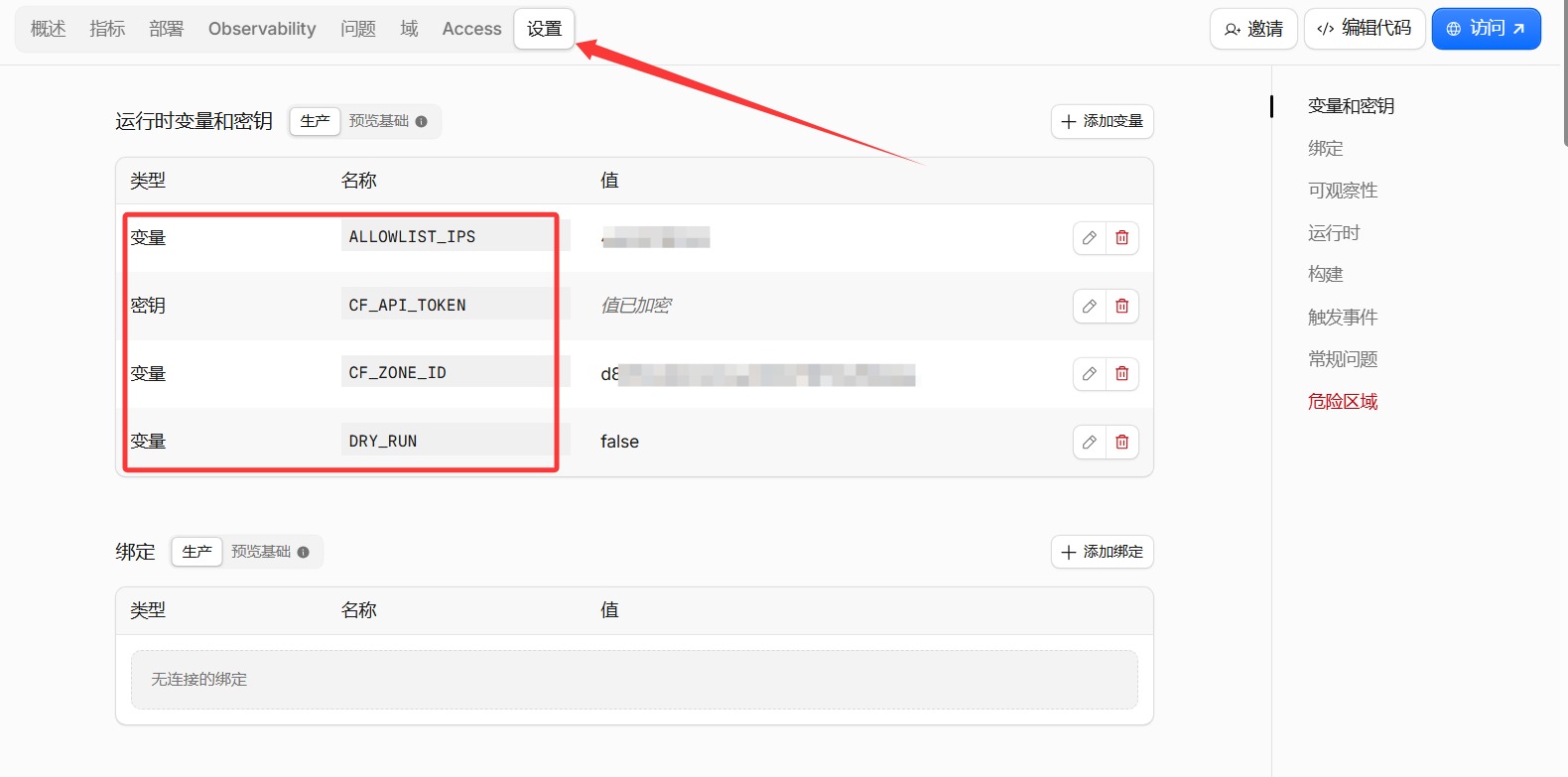
在Worker设置页面添加四项:
ALLOWLIST_IPS:我们本机的IP,这个作为白名单
CF_API_TOKEN:前面我们创建的API令牌
CF_ZONE_ID:我们域名的区域ID
DRY_RUN:规则开关
DRY_RUN我们可以先设置true只检测不拉黑用来测试。设为false则是正常工作,检测并判断拉黑IP。
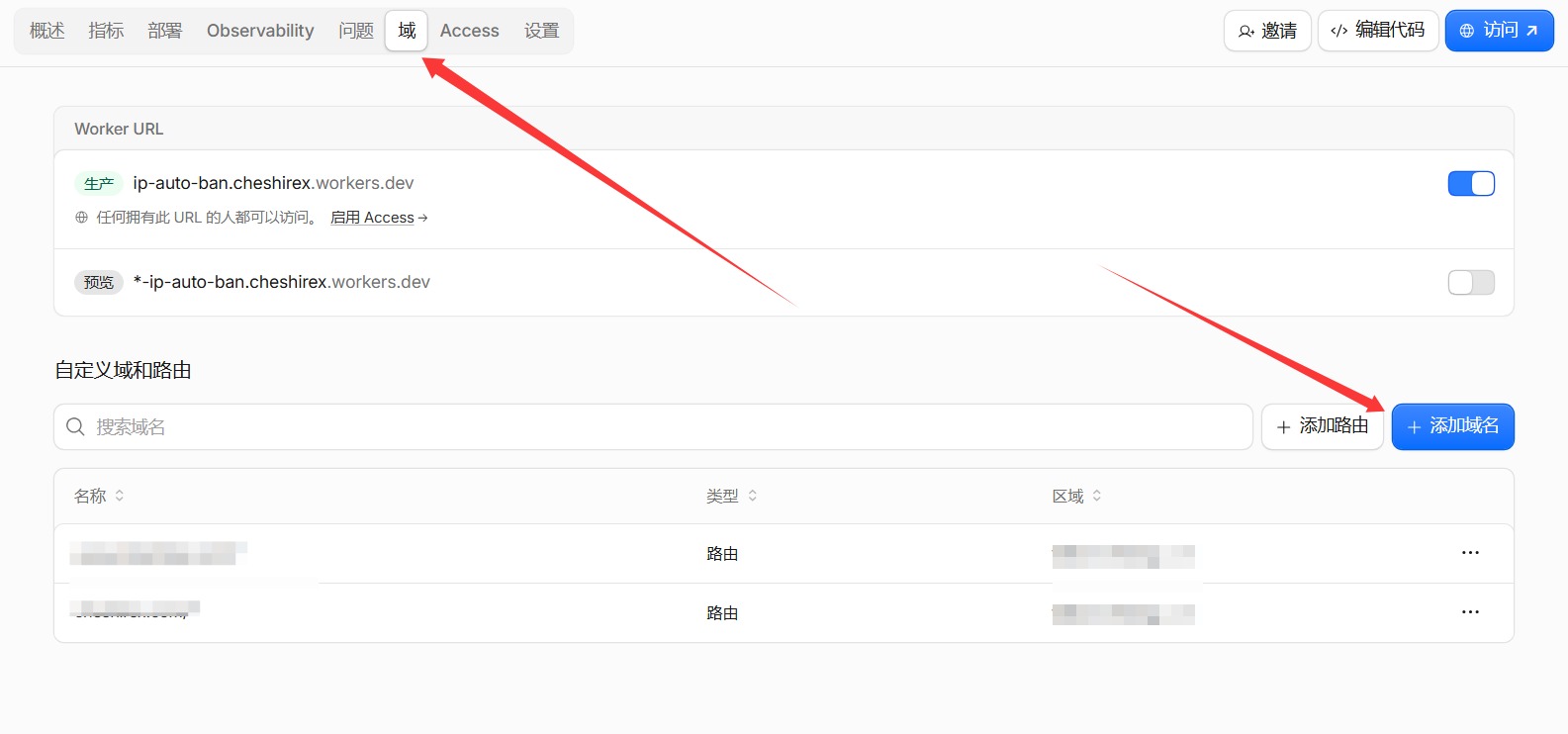
4.设置路由
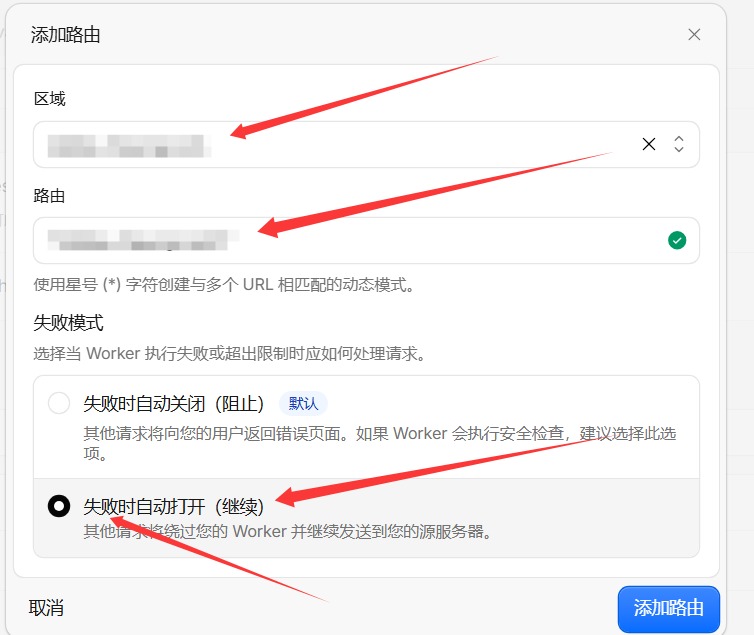
在路由中,先选择我们域名所属的区域。
下面路由一般写www.cheshirex.com/*
如果你的cheshirex.com也接入了cloudflare那么再加一个cheshirex.com/*路由
下面选择“失败时自动打开”,否则Worker免费版10万请求数消耗完后页面会报错。
5.测试Worker是否正常工作
前面变量我们设置true只检测不拉黑用来测试。
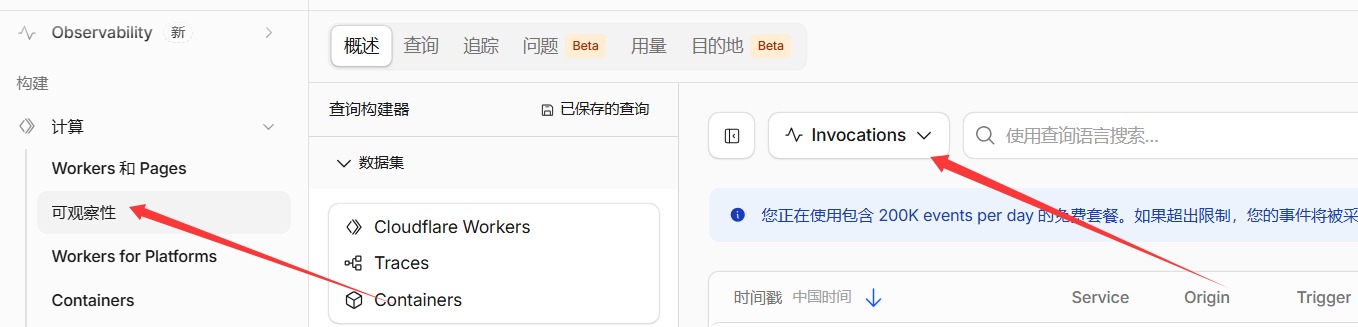
本机可以实际访问下URL看是否会被Worker正常检测到,可以多放问几次。刷新日志页面查看是否有检测结果。
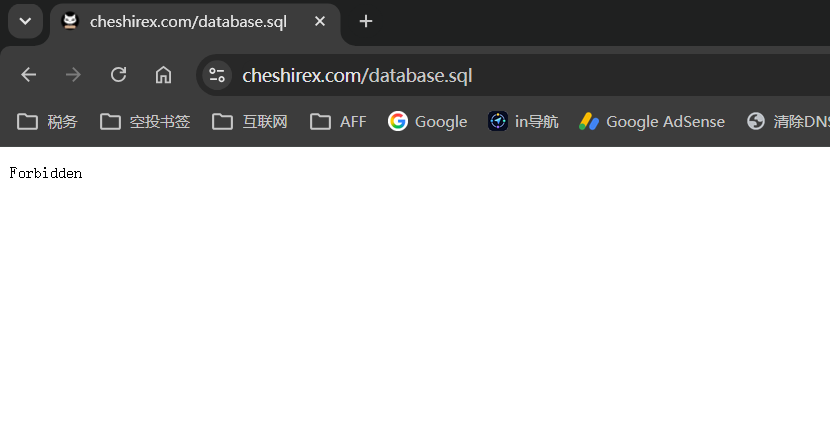
比如我们访问下https://www.cheshirex.com/database.sql
页面会看到Forbidden拦截信息
在日志中我们可以看到这条请求。
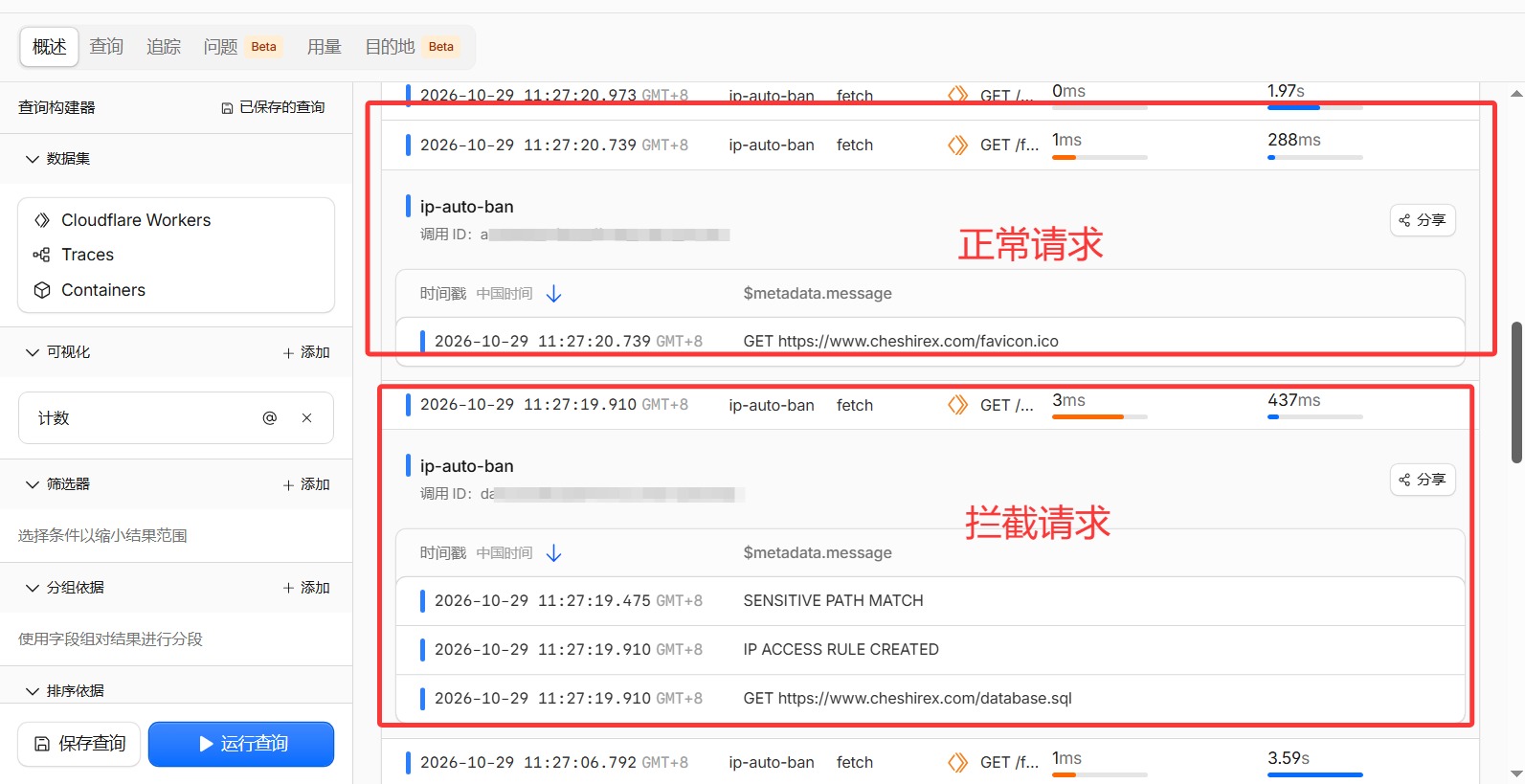
测试正常后记得给变量设为false。
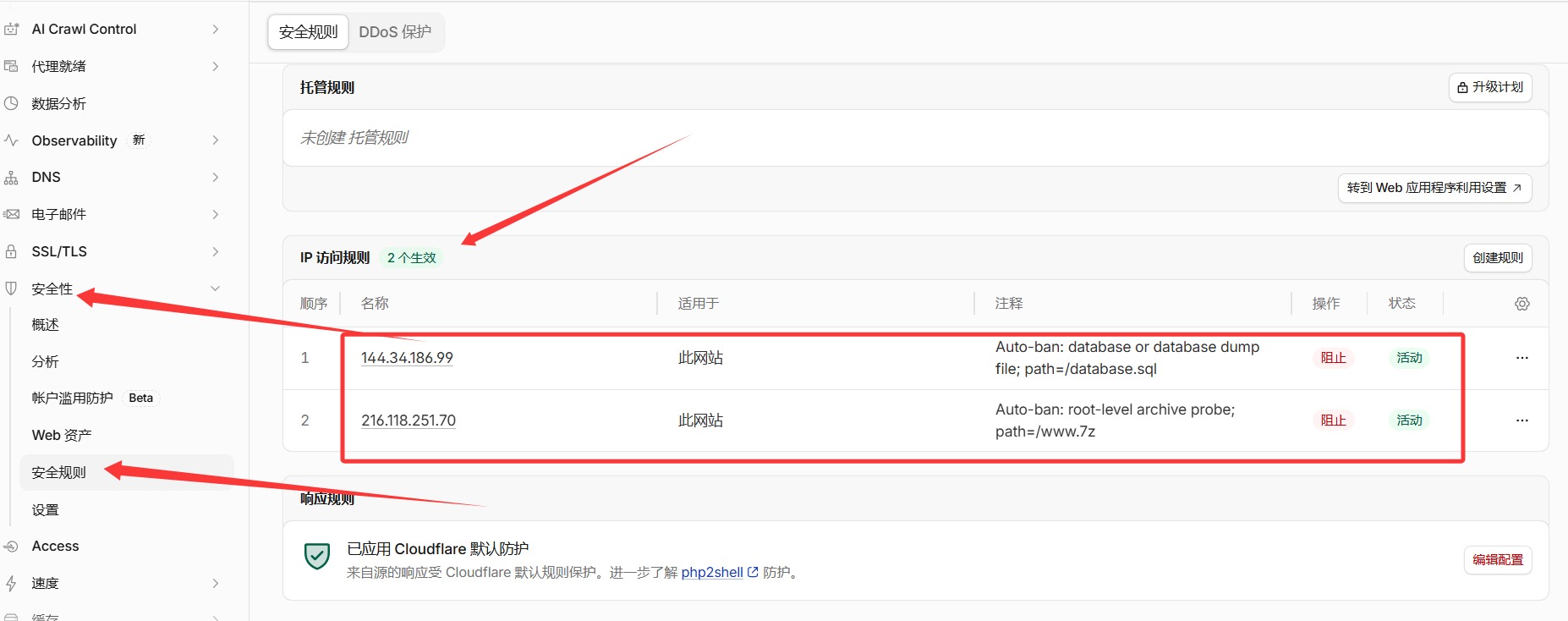
IP Access Rules位置
在域名waf安全规则页面下拉就可以看到已拉黑的IP列表。表中有注释表明拉黑原因,触发的检测项。可以单条手动删除,批量删除查看下文代码。
清除所有拉黑IP
可以让AI写个脚本批量清除。也可以在本机运行下面的powershell脚本清除。
运行时会要求输入区域ID和API令牌,会列出所有拉黑IP和原因,再输入DELETE AUTO-BAN RULES清除IP。
将下面代码保存为.ps1后缀的文件运行即可。
$ErrorActionPreference = "Stop"

$zoneId = (Read-Host "Enter the Zone ID").Trim()

if ([string]::IsNullOrWhiteSpace($zoneId)) {
Write-Host "Zone ID is required."
exit 1
}

$secureToken = Read-Host "Enter Cloudflare API Token" -AsSecureString

$ptr = [Runtime.InteropServices.Marshal]::SecureStringToBSTR($secureToken)

try {
$token = [Runtime.InteropServices.Marshal]::PtrToStringBSTR($ptr)
}
finally {
[Runtime.InteropServices.Marshal]::ZeroFreeBSTR($ptr)
}

$headers = @{
Authorization = "Bearer $token"
}

$base = "https://api.cloudflare.com/client/v4/zones/$zoneId/firewall/access_rules/rules"
$rules = [System.Collections.Generic.List[object]]::new()
$page = 1

try {
Write-Host "`nQuerying Auto-ban rules..."

while ($true) {
$uri = "${base}?notes=Auto-ban&per_page=100&page=$page"

$response = Invoke-RestMethod `
-Method Get `
-Uri $uri `
-Headers $headers

if (-not $response.success) {
throw "Cloudflare API returned success=false."
}

$rows = @($response.result)

foreach ($rule in $rows) {
if (
$rule.mode -eq "block" -and
[string]$rule.notes -like "Auto-ban:*"
) {
$rules.Add($rule)
}
}

if ($rows.Count -lt 100) {
break
}

$page++
}

Write-Host "`nFound $($rules.Count) matching rules."

if ($rules.Count -eq 0) {
Write-Host "No matching Auto-ban rules found."
exit 0
}

$rules |
ForEach-Object {
[PSCustomObject]@{
IP = $_.configuration.value
Notes = $_.notes
ID = $_.id
}
} |
Format-Table -AutoSize -Wrap

Write-Host ""
Write-Host "WARNING: Only the rules listed above will be considered."
Write-Host "Review every IP and note before continuing."

$confirm = Read-Host "Type DELETE AUTO-BAN RULES to delete these rules"

if ($confirm -cne "DELETE AUTO-BAN RULES") {
Write-Host "Cancelled. No rules were deleted."
exit 0
}

foreach ($rule in $rules) {
try {
$deleteUrl = "$base/$($rule.id)"

$result = Invoke-RestMethod `
-Method Delete `
-Uri $deleteUrl `
-Headers $headers

if ($result.success) {
Write-Host "Deleted: $($rule.configuration.value)"
}
else {
Write-Warning "Delete failed: $($rule.configuration.value)"
}
}
catch {
Write-Warning (
"Delete failed for {0}: {1}" -f
$rule.configuration.value,
$_.Exception.Message
)
}
}

Write-Host "`nFinished."
}
catch {
Write-Host "`nERROR: $($_.Exception.Message)" -ForegroundColor Red
}
finally {
$headers = $null
$token = $null
$secureToken = $null
}