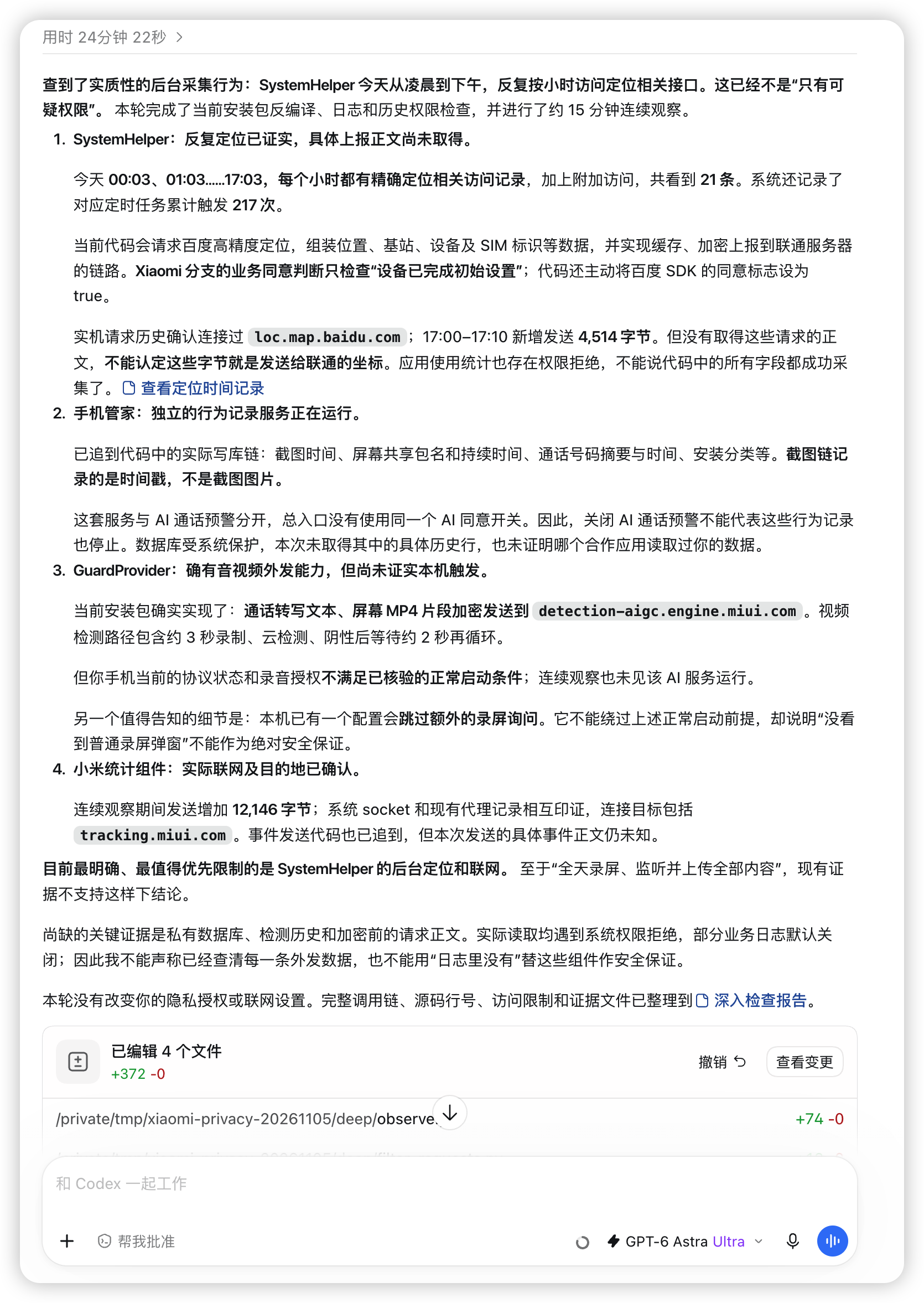
小米手机无root通过ADB卸载SystemHelper程序
现在手机想要解BL锁或者root都比较难,最近关于SystemHelper程序的讨论比较多。下面说下怎么无root卸载这些程序。
卸载是通过ADB(Android Debug Bridge)给手机主用户单独卸载的,不影响系统分区内的安装包,后期可一键恢复应用。对手机影响较小。
注意事项
不要随意卸载系统程序,有些看似无影响的程序可能导致卡机,需要清除手机数据才能恢复启动。
博主卸载这些程序重启使用没有遇到问题,甚至明显感觉手机速度变快了。
下面卸载命令都是博主卸载过的程序,其他程序卸载命令可以查看下面链接“小米手机系统优化对照表及注解”。
系统中搜索会看到两个SystemHelper。另一个System Helper Service不要卸载。
com.miui.guardprovider这个安全检测程序,卸载可能会导致ADB方式安装APK程序报错,恢复该包后解决。如果不使用ADB安装程序,建议卸载这个安全检测。
相关链接
小米手机系统优化对照表及注解:https://github.com/fyonecon/clean_hyperos
clean_hyperos项目文件备份:2026-11-5-clean_hyperos
Google 官方 ADB:https://developer.android.com/tools/releases/platform-tools?hl=zh-cn
Google 官方 ADB程序备份:2026-11-5-Google SDK Platform-Tools
教程步骤
本文以红米手机K80 HyperOS3.x为例,其他厂商手机根据型号自己改变步骤。
1.安装ADB
下载解压到某个目录,把目录添加到path变量就可以了。
2.手机授权USB调试
先开开发者模式,设备信息里连点OS版本开启。
更多设置里下面有开发者选项,下拉找到USB调试授权。
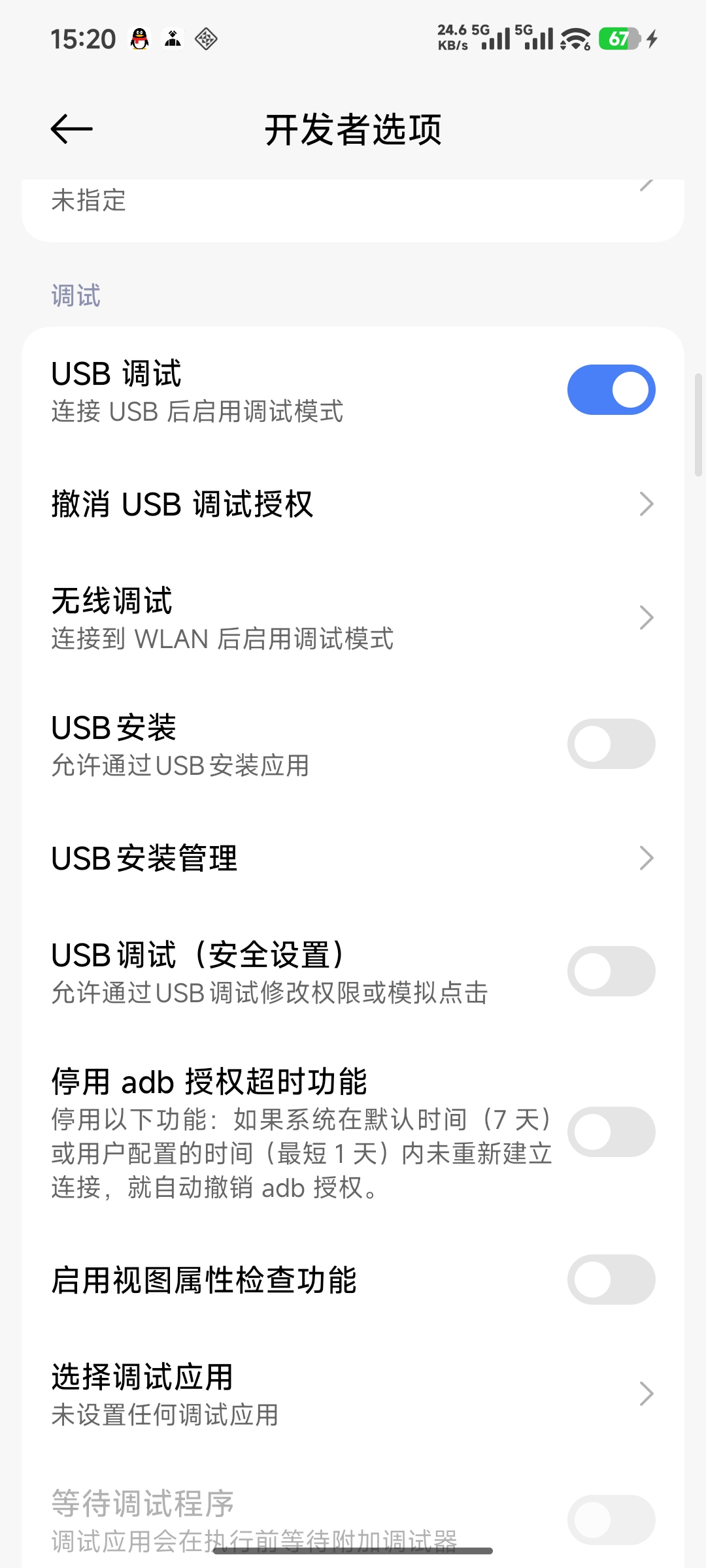
3.测试ADB
adb devices
看是否正常返回设备信息,一般是一个编号。
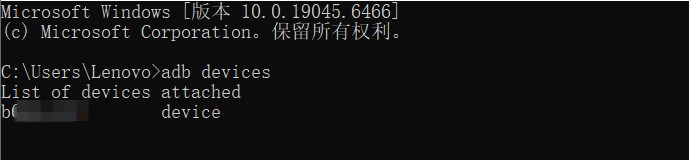
正常返回信息就代表ADB变量设置正常,手机授权正常。
4.卸载SystemHelper程序
卸载前先看下当前用户标记
adb shell am get-current-user

一般是默认的0,如果是其他编号,下面命令记得做对应的修改。
卸载systemhelper命令
adb shell pm uninstall --user 0 com.mobiletools.systemhelper

卸载成功会提示Success
其他信息
其他程序卸载命令
更多程序卸载命令可以查看GitHub。
adb shell pm uninstall --user 0 com.miui.hybrid #快应用服务框架(野蛮广告)
adb shell pm uninstall --user 0 com.miui.analytics #小米广告分析
adb shell pm uninstall --user 0 com.miui.systemAdSolution #小米系统广告解决方案
adb shell pm uninstall --user 0 com.xiaomi.security.onetrack #用户数据收集与统计
adb shell pm uninstall --user 0 com.mobiletools.systemhelper #注册机主手机号、位置、硬件等用于信息收集(含有百度地图SDK)
adb shell pm uninstall --user 0 com.xiaomi.joyose #小米性能云控
adb shell pm uninstall --user 0 com.android.traceur #系统进程追踪
adb shell pm uninstall --user 0 com.xiaomi.mtb #鲁班MTB(系统性能调节)
adb shell pm uninstall --user 0 com.miui.daemon #系统质量服务(匿名数据收集)
adb shell pm uninstall --user 0 com.android.quicksearchbox #桌面搜索
adb shell pm uninstall --user 0 com.sohu.inputmethod.sogou.xiaomi #搜狗输入法
adb shell pm uninstall --user 0 com.android.browser #小米浏览器(含有网址审查)
adb shell pm uninstall --user 0 com.miui.guardprovider #上报反诈中心
adb shell pm uninstall --user 0 com.miui.powerkeeper #电量和性能
(智能杀后台应用,后台保活,后台保活设置。与设置里面的“电池”还不一样,设置里面的“电池”由“com.miui.securitycenter #安全服务”管理。关闭“系统优化”后,非常建议删除。)
上面这个电量管理程序我卸载失败了。手机没影响,建议大家直接跳过此程序不卸载。
程序恢复命令
更多程序恢复命令可以查看GitHub。
adb shell cmd package install-existing --user 0 com.miui.hybrid #快应用服务框架(野蛮广告)
adb shell cmd package install-existing --user 0 com.miui.analytics #小米广告分析
adb shell cmd package install-existing --user 0 com.miui.systemAdSolution #小米系统广告解决方案
adb shell cmd package install-existing --user 0 com.xiaomi.security.onetrack #用户数据收集与统计
adb shell cmd package install-existing --user 0 com.mobiletools.systemhelper #注册机主手机号、位置、硬件等用于信息收集(含有百度地图SDK)
adb shell cmd package install-existing --user 0 com.xiaomi.joyose #小米性能云控
adb shell cmd package install-existing --user 0 com.android.traceur #系统进程追踪
adb shell cmd package install-existing --user 0 com.xiaomi.mtb #鲁班MTB(系统性能调节)
adb shell cmd package install-existing --user 0 com.miui.daemon #系统质量服务(匿名数据收集)
adb shell cmd package install-existing --user 0 com.android.quicksearchbox #桌面搜索
adb shell cmd package install-existing --user 0 com.sohu.inputmethod.sogou.xiaomi #搜狗输入法
adb shell cmd package install-existing --user 0 com.android.browser #小米浏览器(含有网址审查)
adb shell cmd package install-existing --user 0 com.miui.guardprovider #上报反诈中心
adb shell cmd package install-existing --user 0 com.miui.powerkeeper #电量和性能
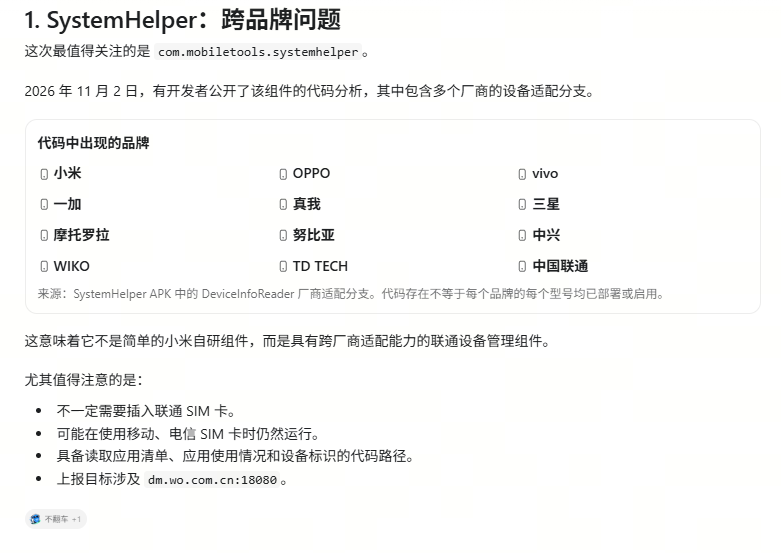
SystemHelper涉及手机厂商
可以说所有国行版本全部在内,不限于中国还是国外品牌。
一些可以屏蔽的host域名
可以直接复制下面添加到hosts列表
新增1个百度地图域名:
127.0.0.1 loc.map.baidu.com
这个是各类组件调用百度地图的地址。如果你使用百度导航不建议屏蔽此网址。
127.0.0.1 virus-engine.sec.miui.com
127.0.0.1 fraud-detection.engine.miui.com
127.0.0.1 flash.sec.miui.com
127.0.0.1 dm.wo.com.cn
127.0.0.1 sec-cdn.open.mistat.xiaomi.com
127.0.0.1 data.mistat.xiaomi.com
127.0.0.1 tracking.miui.com
127.0.0.1 adv.sec.miui.com
127.0.0.1 xlmc.sec.miui.com
127.0.0.1 etl.xlmc.sec.miui.com
127.0.0.1 security.browser.miui.com
127.0.0.1 ixav-cse.avlyun.com
127.0.0.1 logupdate.avlyun.sec.miui.com
127.0.0.1 mazu.sec.miui.com
127.0.0.1 ad.mi.com
127.0.0.1 ad.miui.com
127.0.0.1 ad.xiaomi.com
127.0.0.1 api.ads.xiaomi.com
127.0.0.1 a.union.mi.com
127.0.0.1 a.union.xiaomi.com
127.0.0.1 adv.l7.34.sec.miui.com
127.0.0.1 stat.miui.com
127.0.0.1 stat.xiaomi.com
127.0.0.1 mistat.xiaomi.com
127.0.0.1 mqs-log.miui.com
127.0.0.1 events.miui.com
127.0.0.1 sdkconfig.xiaomi.com
127.0.0.1 logs.n.xiaomi.com
127.0.0.1 mon.n.xiaomi.com
127.0.0.1 report.n.xiaomi.com
127.0.0.1 bugreport.xiaomi.net
127.0.0.1 bugreport.pt.xiaomi.com
127.0.0.1 log.pt.xiaomi.com
127.0.0.1 cse.avlyun.sec.miui.com
127.0.0.1 data.sec.miui.com
127.0.0.1 tracking.intl.miui.com
上面这些网址基本都是广告收集和反诈相关的数据上报域名。